


Play971 App for iPhone and iOS
Apple users expect every app to come from one shop, so the empty search result for Play971 in the App Store usually raises an eyebrow. There’s nothing missing and nothing pending. Play971 was designed as a web app for Safari, and an icon created from Safari gives iPhone owners the whole platform in a standalone window, remembered between visits and always current.
Some ground rules belong up front. Players must be 21 or older, must be on UAE soil at the moment they play, must let the phone share its location, and must have passed the Emirates ID review.
Official iOS Access
Apple’s own browser is the sanctioned doorway. Load the genuine site in Safari, log in, and reels, Evolution’s croupiers, sport and racecards are all there. Pinning it turns that tab into an icon with its own window, much like a downloaded app but without the download.
Newer iOS releases let a few rival browsers place sites on the home screen too, though what you get varies from one browser to the next. Safari ships with every iPhone, treats location prompts predictably and gives the most polished result, so stick with it.
An iPad follows the identical path and pays off handsomely for anyone who enjoys the dealer tables. The larger display makes the roulette layout far easier to tap accurately, and racecards stop feeling cramped.
How to Add or Install on iPhone
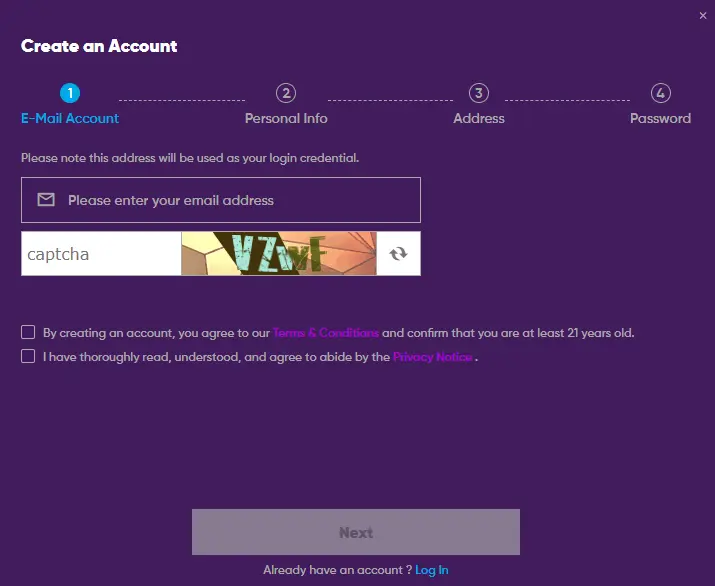
Sixty seconds is plenty.
- In Safari, spell out the Play971 web address rather than following a link
- Log in using whichever of email or phone you registered with
- Approve the location request that pops up
- Hit Share in the toolbar at the foot of the Safari window
- Swipe down the menu to the home screen entry and select it
- Tweak the label if you like and confirm with Add
Can’t spot the home screen entry? It’s sometimes hidden. Scroll to the foot of the share menu, choose Edit Actions and switch it on. Afterwards, shut Safari and tap your new icon. A correct setup opens with no tabs and no address bar in sight.
App Store, Browser or Shortcut: Verify First
Just two of the three routes you might come across are legitimate.
| What turns up | Legitimate? | Your move |
| A store app wearing the Play971 name | No, the operator has never listed one | Don’t install it |
| The real site opened in Safari | Yes | Log in and play |
| An icon you created from that Safari page | Yes | Make it your everyday entrance |

Rogue casino apps sneak onto iPhones through side doors that skip Apple’s review. Watch out for any of these:
- A downloaded configuration profile that Settings asks you to approve
- An app that refuses to open until you trust an unfamiliar developer
- An invitation to test a gambling app through TestFlight
- A website insisting you need any of the above to reach Play971
A quick audit takes seconds. In Settings, go to General and then VPN and Device Management. Any profile or developer there that your employer or school didn’t put on the phone should be deleted, and your Play971 password should be changed from a trusted device straight afterwards.
Login and Mobile Features
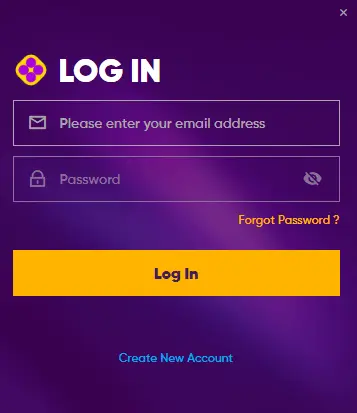
Tap the icon, supply your email or number with the password, and let the silent location lookup finish. It repeats at every launch.
Here’s where the iPhone shines. Apple’s Passwords app, or the older Keychain on earlier versions, can store the Play971 credentials and drop them in after a glance for Face ID or a touch for Touch ID. You get the protection of a long, random password with none of the typing.
The layout suits one-handed use. Tabs glide sideways under your thumb, the bet slip rises from the lower edge, and live tables fill the width of the screen. A few things feel especially at home on an iPhone:
- Quick slots such as Book Of Santa or Siberian Storm, which load in a blink even on mobile data
- Camera tables hosted by Arabic-speaking croupiers, clear and crisp on a Retina display
- In-play football and cricket, with the slip one swipe away while the match runs on television
- Racecards for local meetings, easy to scan in portrait mode
- Spending controls in the account menu, reachable in two taps
Everything is priced in dirhams, so there’s no conversion to think about on a small screen.
Updates and Troubleshooting
The icon itself is never out of date, since each tap fetches the live site. Safari is a different matter, as it only improves when iOS does. Check Settings, then General, then Software Update every so often and install what’s waiting.
Common iPhone hiccups and their cures:
| Symptom | Cure |
| Whereabouts rejected again and again | Under Privacy and Security, then Location Services, let Safari websites use precise location while in use |
| Page half-drawn or buttons missing | Open the page menu beside the address and disable content blockers for this site |
| Icon launches Safari complete with tabs | Delete it and create it afresh from Safari |
| Stale content that won’t refresh | Wipe Play971’s stored data from Safari’s advanced website data list |
| Dealer video freezing | Hop onto Wi-Fi or find stronger reception |
Battery settings can play a part too. Low Power Mode trims background activity and can make live video choppier than usual. If a dealer table struggles while the battery icon is yellow, plug the phone in or switch the mode off for the session, and slots will be fine either way.
Still stuck? The support desk never closes and answers in Arabic or English through chat or email. Quote your iPhone model and iOS version, and describe the message on screen.
Grown-ups of 21 and over, standing inside the country, are the only people Play971 lets in. Leave a spending ceiling active, and reach for a break, an exclusion or a chat with a Takalam counsellor as soon as the enjoyment slips.